



How to Register Your iPhone With PTA (Full Method + Charges)
If you have brought an iPhone into Pakistan, or picked one up from abroad, you’ll have to get it registered with the PTA through the DIRBS/DRS system before it’ll work on local networks. It’s not complicated, but it does need to be done properly.
This guide breaks the process down step by step: checking your IMEI, generating the PSID, paying the tax, and finally confirming that PTA has approved your device. Follow the steps as they’re laid out, and you won’t have to worry about your service getting blocked or running into any surprise penalties later.
Quick Checklist — what you need
- Your iPhone and the ability to dial *#06# to get the IMEI.
- A valid CNIC or passport (choose passport if you’re eligible, as it’s usually cheaper).
- Mobile number and email to register on DIRBS (PTA site).
- Means to pay (internet/mobile banking, ATM, bank branch, or mobile wallet) — note payment methods below.
Step 1 — Find your IMEI and check the current status
- On your iPhone, dial *#06#. The 15-digit IMEI(s) will appear. You can also find IMEI in Settings > General > About.
- Check whether the IMEI is already registered or blocked: use the PTA Device Verification / DIRBS portal or send the IMEI via SMS to 8484 (PTA short-code). The reply will show if registration is required and the tax amount (or whether your device is compliant).
Step 2 — Register on DIRBS (PTA Device Registration System)
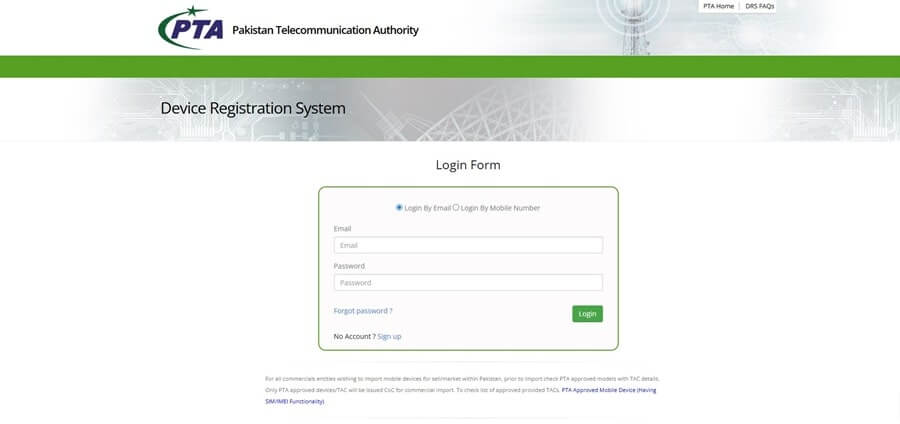
- Go to the official DIRBS registration portal: https://dirbs.pta.gov.pk/drs (or visit PTA’s DVS page).
- Click Sign Up/Register and choose your user type (Local Pakistani / Foreigner). Fill in your accurate CNIC or passport number, name, email, and phone.
- Confirm your account via the activation link sent to your email / OTP on your phone.
- Log in and choose Apply for Certificate of Compliance (CoC) or Device Registration, then enter the IMEI and required personal info. The system will calculate your applicable tax and produce a PSID (Payment Slip ID), a 17-digit number used to pay the tax.
Step 3 — Understand the Charges: Passport vs CNIC
There are two types of registrants:
- Passport-based registration (travellers) usually attracts a lower tariff because it is treated as a temporary import for personal use. You typically have up to 60–120 days (check PTA announcement) to register under passport rules.
- CNIC-based registration (residents) usually carries higher tax/duties than passport registration, and the DIRBS system will show the exact PKR amount for your model and status. The final PSID amount depends on device category, CIF/value, and applicable budget/tariff changes.
Step 4 — Typical iPhone charges (examples & how to estimate)
- iPhone taxes vary widely by model. Online calculators like PakTaxCalculator and other PTA-tax tools show up-to-date model-wise estimates (these are updated after budget changes).
- Older mid-range iPhone models may show lower PSID ranges; flagship models (latest iPhones) typically show the highest PSID (often tens of thousands of PKR).
For updated model-wise tax figures, you can check https://paktaxcalculator.pk/iphone-pta-tax-in-pakistan-2025/
It provides estimated PTA tax ranges for different iPhone models, but always confirm your final PSID amount directly through the DIRBS portal.
Step 5 — How to Pay the PSID (Payment Methods)
After the DIRBS system generates the PSID, pay it using one of the accepted channels. PTA and banking partners support multiple channels:
Common payment channels (PSID):
● Internet / Mobile Banking: Most major banks (HBL, UBL, Meezan, etc.) allow government bill payments: look for Bill Payments → Government Payments → FBR → PSID, then enter the 17-digit PSID.
● ATM: Many ATMs offer a Government Payments / PSID option.
● Bank Branch: Visit any participating bank branch and pay the PSID. Some users still prefer this when digital options are unstable.
● Mobile Wallets / Agents: Easypaisa, JazzCash, and some other wallets and telco agents support PSID payments (look for the Government/FBR/PSID option in the app). Confirm availability in your wallet app before relying on it.
Important: Keep the payment receipt/screenshot and PSID for records. PTA typically updates registration within 24–72 hours after verified payment, though some confirmations come faster.
Step 6 — After Payment: Verification and Confirmation
PTA / DIRBS processes payment confirmation and updates the IMEI status. You will receive SMS/email confirmation once the device is approved.
If not approved within 72 hours, contact PTA/DIRBS help or your bank/payment provider with the PSID and transaction reference.
Common Errors & Troubleshooting
IMEI typed incorrectly: the DIRBS system will not match; recheck *#06# and ensure no spaces.
PSID expired: PSIDs often have limited validity (e.g., 7 days) — generate a fresh PSID if required. PTA has a policy on PSID validity; check the DIRBS messages during generation.
Payment method not accepting PSID: try a different bank app or visit a bank branch / ATM. Keep the transaction proof.
Conclusion
Registering your iPhone with PTA isn’t complicated once you know the correct steps — check your IMEI, create a DIRBS account, generate your PSID, and pay the required tax through any supported banking channel.
The key is to ensure your information is accurate and to rely on the official DIRBS system for the final tax amount. Whether you travel often or just bought the phone from someone who did, getting your device registered with PTA saves you from the headache of sudden service blockage later on. It also keeps the phone fully compliant, so you’re not worrying about it every time you switch SIMs or update your plan.
And honestly, the process isn’t as complicated as most people make it. If you follow the steps in this guide exactly, you can get the whole thing done in a few minutes, without the usual back-and-forth or the confusion people run into on the PTA website.
FAQs
Can I register more than one phone on my passport?
Answer:PTA rules allow certain allowances for travellers — check the DIRBS rules and time limits for temporary registration.
What happens if I don’t register?
Answer: Unregistered IMEIs may be blocked from using local mobile networks. Avoid this by registering immediately.
Can I register someone else’s phone with my CNIC?
Answer: Registration rules differ for passenger vs resident registrations. Always follow DIRBS prompts and provide truthful information.
References:
- https://dirbs.pta.gov.pk/drs/auth/register_individual
- https://www.pta.gov.pk/category/overseas-pakistanis-can-register-mobile-devices-for-temporary-use-of-up-to-120-days-178668887-2025-04-28
- https://www.pta.gov.pk/category/payment-slip-identification-psid
- https://paktaxcalculator.pk/iphone-pta-tax-in-pakistan-2025/
- https://newmobilepriceinpakistan.com/how-to-pay-pta-tax-online/
